Sending us your heat data
If your building is on Utilitas district heating, your metered heat consumption is the single most useful thing you can send us — it is the exact quantity our offer would replace. It takes about three minutes to export, and you end up with one file covering every year on record.
Not on Utilitas? Skip this and send us whatever your heat supplier bills you instead — or, if you heat with gas, oil or electricity, send the electricity data and your fuel bills.
Red arrows in the screenshots mark what to click. The black bars cover our own client and building names — your screen will show yours.
- 01
Log in
Open iseteenindus.utilitas.ee and sign in with the account your building uses for Utilitas.
Unlike Elering, this portal has no English version. Every button below is given in Estonian exactly as it appears, with the English meaning after it.
- 02
Open the heat consumption view
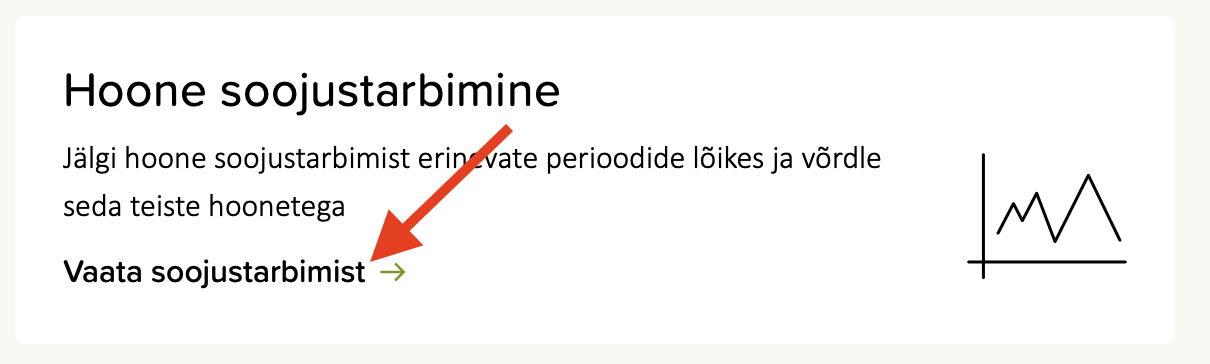
On the dashboard find the card Hoone soojustarbimine (building heat consumption) and click Vaata soojustarbimist (view heat consumption).
- 03
Choose the client and building
Set Vali klient (select client) and Vali hoone (select building). If you only have one of each, they are already filled in and there is nothing to change.

If you hold several buildings, repeat the whole export once per building and tell us which file is which — the download does not name the building inside the file.
- 04
Set the period and interval
Two dropdowns on the right-hand card.
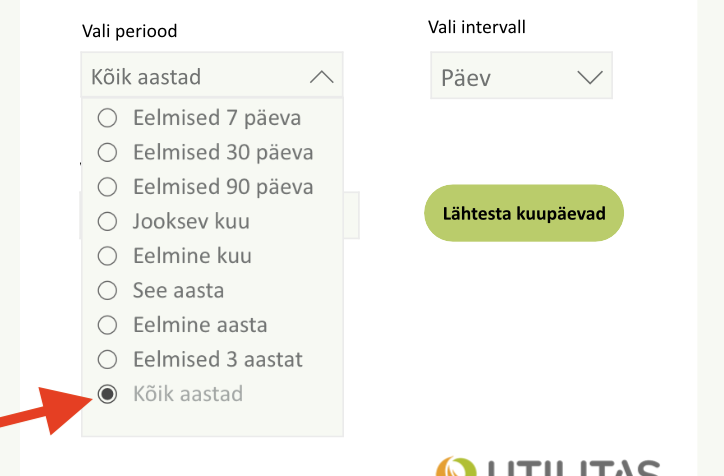
- Vali periood
- Kõik aastad — "all years". It is the last option in the list, below Eelmised 3 aastat.
- Vali intervall
- Päev — "day". Daily is the finest interval offered, and it is what we want.
Take the longest history the portal will give you. Heat demand swings hard with the weather, so a single mild or harsh winter on its own tells us very little.
- 05
Download the table
Click Laadi alla tabelina (download as table) at the top right. Send us the file exactly as it downloads — no need to open or tidy it.

Do not use Prindi (print) next to it. We need the data file, not a PDF of the chart.
What to send
One downloaded table per building, covering all years at daily interval. Send it exactly as it arrives.
Why we ask for it
- It is the number the offer rests on
- We sell you heat by the megawatt-hour. How many you actually buy, and in which months, is what decides whether our price beats what you pay Utilitas today.
- Summer is the deciding season
- Daily data separates space heating from hot water. A building with real summer demand can support a node that earns all twelve months; one that goes quiet in May cannot.
- Sizing against load, not floor area
- Floor area gives a guess. Metered daily heat gives us the actual base load to size a node against, and a defensible share for a first contract.
We use the data to assess your building and nothing else. It is not shared outside HeatLoop, and if you decide against the project you can ask us to delete it.
Heat is half the picture. The other half is your electricity data, which tells us whether the connection has room for the rack that produces the heat.
Send the file over
Attach the downloaded table and tell us which building it belongs to. If something in the export did not work, say what you got stuck on — we will sort it out.
- Building address
- Utilitas heat consumption table, all years
- Roughly what you pay per MWh, if you know it
info@heatloop.com